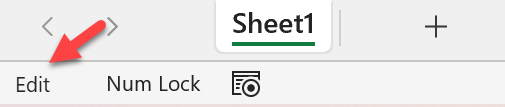
Edit Mode
Glossaries
| Term | Definition |
|---|---|
| Edit Mode |
Glossaries - Excel Terminology
Edit Mode is activated when editing a formula. Editing may be commenced by selecting a cell and then pressing F2 the edit shortcut, double-clicking the cell (if editing in cells is on) or clicking in the formula bar.. While in Edit Mode, any cursor movement keystrokes will move the insertion cursor within the expression or value being entered, and the selection keystrokes select one or more characters or 'words' in the value or expression. [click the link to see a screenshot of the Edit Mode flag] The screenshot below shows the Edit Mode status flag at the left-hand edge of the Status Bar at the bottom of the document window.
|