End Mode
Glossaries
| Term | Definition |
|---|---|
| End Mode |
Glossaries - Excel Terminology
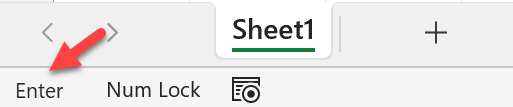
End Mode is activated or cancelled by pressing the End key, providing legacy support for range selection, as used in DOS spreadsheets. When End Mode is set, the action taken depends upon the next key pressed.. [click the link to learn more and see a screenshot of the End Mode flag] When End Mode is set, pressing the Enter key moves the active cell to the end of its row. Then end being the column of that row which is the last used or formatted column in the worksheet. pressing the arrow keys moves to the edge of the data region in that direction, or the next data region, or the edge of the worksheet. Pressing Home moves to the last cell. The screenshot below shows the Enter Mode status flag at the left-hand edge of the Status Bar at the bottom of the document window.
|